Don't chase your money. Let Silo capture it for you.
50% off for a limited time
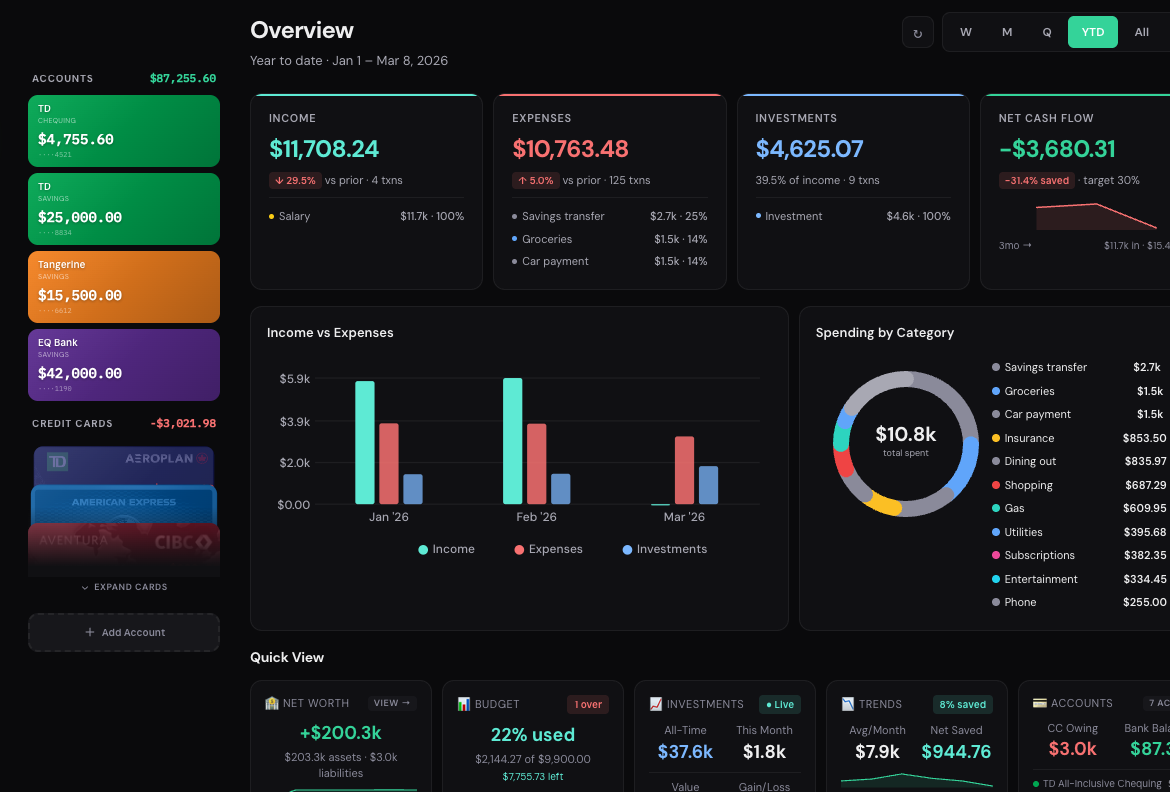
Overview
Your total financial breakdown, all at a glance
Multiple bank accounts, credit cards, investments, and cash - all in one view
Income vs expenses across weekly, monthly, yearly, and custom time frames
Net worth tracking updated in real time
Recent transactions with smart auto-categorization
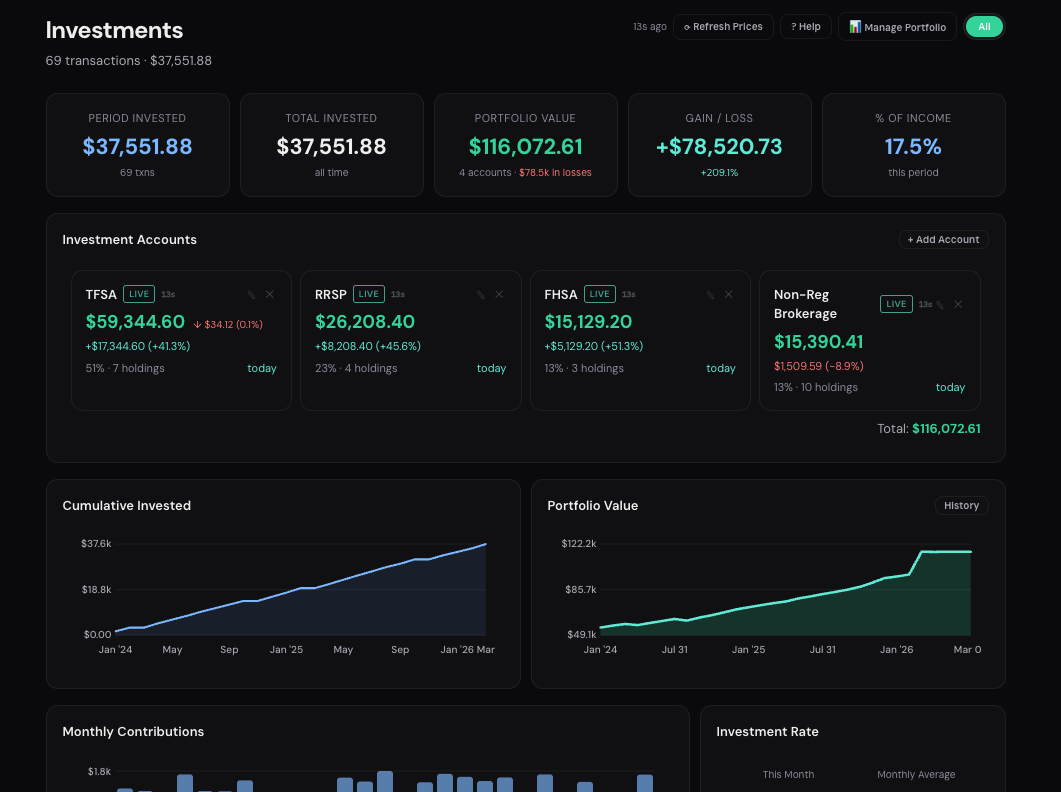
Investments
Watch your portfolio grow in real time
Automated live price updates - stocks, ETFs, and crypto refresh on their own
Portfolio value tracked across all accounts automatically
Gain/loss and cost basis calculated for you - no manual entry
Performance charts that update as the market moves
Easy import directly from your broker to add and update holdings in seconds
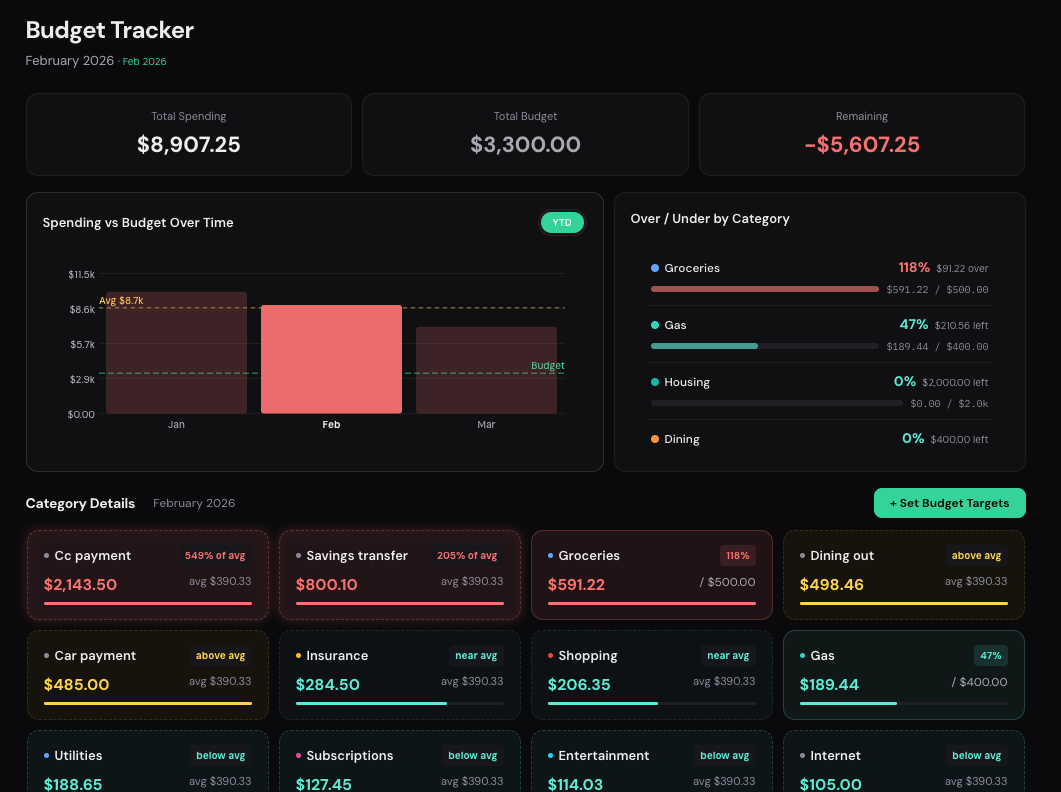
Budgets
Set limits and stay on track automatically
Category budgets with real-time progress bars
Over-budget alerts that flag overspending
Monthly vs actual comparisons at a glance
Savings goals with visual milestones
Gain real insight on your spending habits without giving your data away to other companies
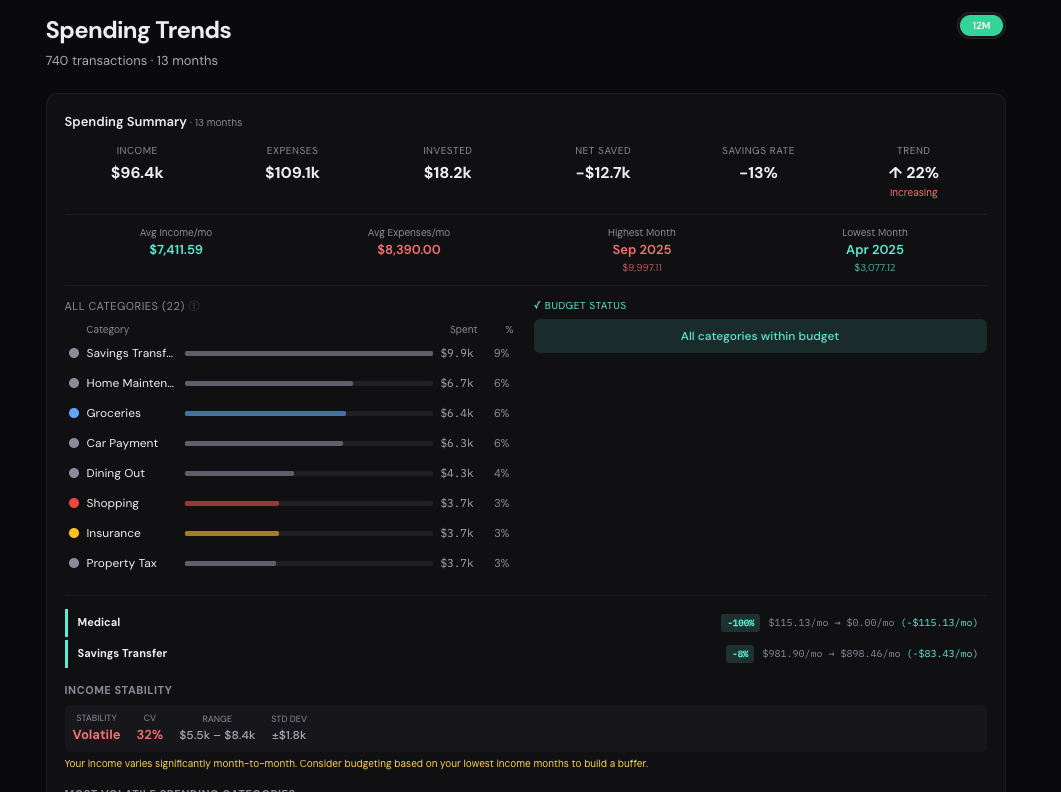
Spending Trends
See exactly where your money goes
Category breakdown with interactive charts
Month-over-month spending comparisons
Auto-generated insights and savings rate
Smart summary written in plain language
Let Silo tell you what it's learned about you and what it notices about your spending habits
Your personal financial advisor to guide you along and give you the right advice
Import years of data in under 60 seconds. This is what total clarity looks like.
Testimonials
Loved by people who value clarity.
Real feedback from real users.
★★★★★
"Okay, the first setup took me maybe 15 mins because I have like... way too many accounts. But after that? Actually crazy. I saw stuff about my spending I totally missed for years. It's just one view and finally makes sense."
Sarah Jenkins
★★★★★
"I'm done with apps that need my bank login just to break 2 days later. I just grab the export from my brokerage, drop it into Silo, and it's updated. Simple. It's the only way I track my portfolio now."
Marcus Thorne
★★★★★
"i spend maybe 5 minutes a week on this. tops. i just put my data in on sundays and now i actually know if we are over budget or not. honestly having that 5 minute routine has just brought back my life lol. no more guessing."
Elena Rodriguez
★★★★★
"Silo is a beast for my agency. We were paying our bookkeeper way too much just to categorize basic stuff. Now we just upload the statements and Silo does the heavy lifting. Saved us thousands in fees and literally hundreds of hours of manual work. Absolute lifesaver."
David 'Dax' Patterson
★★★★★
"Honestly I only signed up because it's 100% private. I'm tired of these fintech apps selling my data. The fact that the UI is actually clean and doesn't lag is a huge bonus. I'm in and out in minutes."
Julian V.
★★★★★
"I was using 5 different apps before and still I am confused. My friend tell me try this. Took a little bit of time to upload everything at start, but man... the visual outlay is so good. I see everything now. Highly recommend if you are tired of being confused."
Aris K.
★★★★★
"The auto-categorize feature is actually scary good. I thought uploading files would be a pain but it's way faster than fixing all the mistakes my old 'syncing' app made. Everything stays organized and I don't have to worry about my data leaking."
Chloe L.
★★★★★
"Almost perfect. I moved all my personal and business stuff over from a messy spreadsheet and the organization is 10/10. My only real gripe is I wish there was a dedicated 'Tax Export' view to just one-click send a report to my accountant for filing. Right now I have to grab the categorization data myself, which is still fast, but a specific export button for tax season would make this a 5-star app for me. Other than that, it's the best privacy-first tool I've found."
Leo G.
Try It
Experience Silo
Click through each step to see how Silo works.
1
Upload
→
2
Categorize
→
3
Dashboard
td_chequing_2024.csv148 KB
↑ Drag this file into the box below
Drop your CSV file here
drag the file above into this area
Review Import
Instant
·
Silo learned: 0%
Processing...
Accounts$25,078
TD Chequing
$4,218
RBC Savings
$12,540
Wealthsimple TFSA
$8,320
Total$25,078
Credit Cards-$1,930
TD Cash Back ••4821
-$1,247
Amex Cobalt ••9012
-$683
Scotia Momentum ••3344
$0
Owing-$1,930
Income
$6,480
↑ 12.3% vs prior · 4 txns
Expenses
$3,847
↑ 3.1% vs prior · 142 txns
Investments
$1,500
23.1% of income · 2 txns
Net Cash Flow
+$1,133
17.5% saved · target 30%
Income vs Expenses
Spending Summaryauto-generated
Avg Monthly
$3,847
Savings Rate
40.6%
Top Category
Housing
Trend
↓ Decreasing
"You spent 12% less on dining vs your 6-month average. Housing remains your largest category at $1,890/mo. Net cash flow is positive at +$1,133 — above your 30% target."
This is a simplified demo — the real Silo is far more advanced and capable. But it really is that simple.
Why Silo
Your finances shouldn't feel like a full-time job.
Whether you're wrestling with spreadsheets, juggling bank apps, or overpaying for tools that still can't show you the full picture - there's a better way.
Your data matters. We never see your data. It lives on your computer and never gets shared with anyone outside of your individual Silo app.
The Old Way
×Spreadsheets that break, go stale, or take hours to maintain
×Logging into 4+ bank apps just to see where you stand
×No real-time prices - your portfolio value is always outdated
×Can't see how spending, investments, and debts connect
×Tax season means digging through 12 months of statements
×Budgeting apps that sell your data or require bank login
×$15-$50/month for tools that still can't show the full picture
With Silo
✓Import a CSV in 30 seconds - Silo categorizes everything automatically
✓Smart Import learns your habits and gets smarter every time
✓Live prices update your portfolio and net worth in real time
✓Every account, asset, and loan - one unified dashboard
✓Tax estimates built automatically from your actual data
✓Beautiful charts, spending trends, and cash flow analysis built in
✓100% offline - your data never leaves your computer
✓From $6.99/mo or $72.99/yr — save 15% with annual
Current Active Features
Everything you need. Nothing you don't.
Every feature below is live and included in every plan. No upsells, no premium tiers.
🏦
All-in-One
Every account. One place.
Bank accounts, credit cards, investments, crypto, assets, loans - everything that makes up your financial life, unified in a single dashboard. No more switching between apps. Silo gives you the most complete picture of your money available anywhere. Stop switching between your bank app, your credit card portal, your brokerage, and a spreadsheet.
💰Deposits$4,230.00
💸Expenses−$1,340.50
📈TFSA Live$32,610.00
🏠Home$485,000
🏦Mortgage−$312,400
🧠
Smart Import
Gets smarter every import
Import a CSV, paste directly from your bank statement or bank website, or add manual entries. Silo auto-categorises every transaction based on your patterns. The more you use it, the more it understands you - until tagging is essentially automatic. Within 2-3 imports, most users report near-zero manual corrections.
DiningTim Hortons #8821$6.4598%
GroceriesSafeway #1044$143.20100%
SubscriptionsNETFLIX.COM$18.99learned
GasSHELL GAS STN 4412$62.30100%
ShoppingAMAZON.CA *1K8R2$34.97learned
DiningUBER EATS 8F2G1$28.4095%
6 transactions6 auto-categorized · 0 manual
📈
Live
Real-time investment tracking
Monitor your investment values in real time, automatically updated as they grow. Stocks, ETFs, crypto, and mutual funds across every major exchange - always current, always accurate.
NVDA · NASDAQ
$143.50 → $146.32 · just now
+1.96%
BTC · Crypto
$98,100 → $97,420 · 2m ago
−0.69%
VFV.TO · TSX
$132.40 → $133.80 · 5m ago
+1.06%
Portfolio Value$48,240 +2.4%
JanFebMarAprMayNow
🔒
100% Private
Everything runs locally on your machine. No accounts, no servers, no syncing your financial life to anyone else's cloud. Your data file is yours. Unlike Mint, YNAB, or other cloud apps, Silo never asks for your bank login. Ever.
AES-256-GCM encryption
Military-grade. Same standard as online banking.
Key stored in OS Keychain
Protected by your Mac or Windows login.
Zero network requests
No cloud, no servers, no bank logins. Ever.
No account required
No sign-up, no email tracking, no ads.
💡
Auto-Generated
Spending insights
Silo automatically generates smart summaries of your spending habits, savings rate, and trends. See exactly where your money goes - broken down by category, time period, and account - without lifting a finger.
March Summaryauto-generated
Total spent$2,847.30
Savings rate34.2%
Top categoryGroceries · $680
vs last month↓ 8.1% less
"You spent 12% less on dining this month. Grocery spending is up slightly but still under budget. Net cash flow is positive at +$1,480."
🎯
Budgets & Goals
Category budgets, spending trends, and retirement projections with compound growth modelling. See exactly where you're overspending before the month ends.
March Budgets21 days remaining
Groceries$420 / $500
$80 remaining · on track
Dining$180 / $200
$20 remaining · close to limit
Entertainment$340 / $250
⚠ $90 over budget
Shopping$95 / $300
$205 remaining · well under
Roadmap
What's coming next
Silo is actively developed and every update is free. Here's what's on deck.
Professional export reports
Clean, formatted income & expense reports your accountant will actually love. Export by date range, category, or business - ready for tax season in one click.
Custom sections
Go beyond Personal and Business. Create as many custom sections as you need - rental properties, side hustles, joint accounts, investment clubs - each with its own transactions, budgets, and analytics, all under one roof.
Financial forecasting
Predict future spending and savings based on your real habits. See where you'll be in 3, 6, or 12 months - powered by your own data, not guesswork.
iOS App Coming Soon
Your full financial dashboard, in your pocket. Track spending, monitor investments, and stay on top of your money from anywhere - synced with your desktop data.
And much more - receipt attachments, goal tracking, multi-currency support, and more. Every update is free.
Your support directly funds development. Your feedback shapes every update. This is your app, built around how you actually use it.
Prices in USD · Mac & Windows · Already have a license? Download Silo
No bank login required
What is a CSV file?
A CSV (Comma-Separated Values) file is a simple spreadsheet your bank generates with your transaction history. Every bank lets you download one. It's the safest way to manage your finances.
🏦
1. Log into your bank
Go to your transaction history or statements page online
📥
2. Download as CSV
Click Export or Download and choose the CSV format
⚡
3. Import into Silo
Drag and drop your file — Silo categorizes everything automatically
CSV files are completely safe. They contain only transaction dates, descriptions, and amounts — no passwords, no login credentials, no account numbers. Your files never leave your computer. Silo works 100% offline.
Most users are able to bulk import years of data in less than 5 minutes. Thanks to Silo's Smart Import, it's quick and easy - and only gets better the more that you use it.
Silo ships with 1,150+ built-in merchant mappings that instantly recognize common transactions. When you import a CSV or paste from your bank, it auto-categorises each entry. It also learns from every correction you make - building custom rules for your unique spending habits and categories. The more you use it, the smarter it gets. Most users reach near-zero manual corrections within a few imports.
Just download a CSV from your bank whenever you want to update and import it into Silo. You can also paste transactions directly from your bank's website or add them manually. Duplicate transactions are automatically detected and filtered out, so only new entries make it through - already categorized. Spend less time on data entry and more time using Silo to make smarter financial decisions.
Silo refreshes your portfolio prices on launch and on a regular schedule. You can set custom price thresholds for any holding - stock, ETF, or crypto. When a price crosses your trigger, you get notified instantly within the app. No third-party service required, and no data leaves your machine to make it happen.
Yes - completely. Silo runs entirely on your local machine. Your transactions, account details, and financial history never leave your computer. No servers, no cloud sync, no bank connections. Your data is one file on your hard drive that you control entirely.
No - and that's intentional. You import transactions by downloading a CSV from your bank's website and importing it into Silo. Smart Import then handles categorisation automatically, so it's fast. No OAuth tokens, no Plaid, no bank credentials stored anywhere.
Both plans include every feature - personal, business, tax tools, investments, the works. Monthly is $9.99/month, cancel anytime. Lifetime is a one-time $59.99 that grants permanent access, all future updates, live support, and priority feature requests. If you use Silo for more than 6 months, Lifetime is cheaper.
Silo supports live prices from NASDAQ, NYSE, TSX, TSX-V, LSE, XETRA, ASX, HKEX and more via Yahoo Finance. Crypto via CoinGecko. Canadian mutual funds via Fund Library and Globe and Mail. If it has a ticker symbol, it almost certainly works.
Privacy Policy
Last updated: March 11, 2026
Overview
Silo is a locally-run desktop application developed by Silo Inc. We are committed to your privacy. This policy explains what limited data we collect, why, and how it is used.
Data We Do Not Collect
Silo does not collect, transmit, store, or share any of the following on our servers:
Your financial transactions, balances, or account data
Bank credentials or login information
Investment holdings or portfolio information
Personal tax or income information entered into the app
All financial data you enter or import into Silo is encrypted using AES-256-GCM and stored exclusively on your own device. It never leaves your machine unless you explicitly enable Cloud Sync, in which case it is end-to-end encrypted before transmission.
Data We Do Collect
When you purchase or register for Silo, we collect your email address (for licence delivery and notifications) and purchase records processed by our payment provider. When the app checks for updates or fetches live market prices, those requests contain only version numbers or ticker symbols — no personal data is ever transmitted.
Bank Account Linking (Plaid)
Silo offers optional bank account linking powered by Plaid Inc. When you choose to connect a bank account, you will be asked for your explicit consent before any connection is established. Plaid facilitates a secure connection between your bank and Silo to retrieve transaction data. Here is how your data is handled:
What data is accessed: Account balances and transaction history from the accounts you choose to connect.
How it is stored: Retrieved transaction data is encrypted and stored locally on your device only. Silo does not store your bank data on any external server.
Authentication tokens: Plaid access tokens are stored in an encrypted local file on your device, protected by your operating system's keychain.
Your control: You can disconnect any linked account at any time from within the app. Disconnecting removes the stored access token and all associated data from your device.
Plaid's privacy policy: Plaid's handling of your data is governed by their own privacy policy, available at plaid.com/legal.
App Security
Silo supports biometric authentication (Touch ID on macOS, Windows Hello) and PIN code protection to prevent unauthorised access to your financial data. All locally stored data is encrypted with AES-256-GCM, and encryption keys are secured via your operating system's credential manager.
Smart Import
The Smart Import feature processes your transaction data entirely on your local device. No transaction data is ever sent to a server for categorisation or machine learning. All pattern matching runs locally on your machine.
Email Communications
By providing your email address, you agree to receive product updates and important notices. You may unsubscribe at any time via the link in any email.
Data Retention & Deletion
Your financial data exists only on your local device (and optionally in your end-to-end encrypted Cloud Sync). To delete all data, simply remove your local data file or uninstall the app. There is no server-side financial data to request deletion of.
By purchasing or using Silo, you agree to be bound by these Terms of Service. If you do not agree, do not install or use the software.
Licence Grant
Upon purchase, Silo Inc. grants you a non-exclusive, non-transferable licence to install and use Silo on your own devices. You may not sublicense, resell, or distribute the software or your licence.
Subscription & Billing
Monthly subscriptions are billed at $9.99 USD per month and may be cancelled at any time. Upon cancellation, access continues until the end of the current billing period. The Lifetime licence is a one-time purchase of $59.99 USD granting permanent access including all future updates.
Restrictions
You agree not to reverse engineer, decompile, copy, modify, distribute, or remove any proprietary notices from the software.
Disclaimer of Warranties
Silo is provided "as is." Financial figures, tax estimates, and projections are for informational purposes only and do not constitute financial, tax, or legal advice. Always consult a qualified professional for financial decisions.
Limitation of Liability
To the maximum extent permitted by law, Silo Inc. shall not be liable for any indirect, incidental, or consequential damages arising from your use of Silo.
Governing Law
These terms are governed by the laws of the Province of Alberta, Canada.